go up a level

Creative evening 2021.09.03


download (325MB)

In this case, the musical program does not consist of two mixes and a finale, as described in the essay "My creativity", but of three mixes and a finale. This is done to simplify the construction of the program: 3 shorter mixes are easier to make than 2 longer ones.

* * *

In my creativity I use my own computer programs, in particular the mixlab program. In the attached video you can see it in action. In the future, I plan to publish all my programs on this site (in fact, I've been planning this for a long time, but more important tasks always arise). In the meantime, I would like to comment on some features of the mixlab program.

Two equalizers instead of one

The equalizer in DJ programs and equipment performs two tasks:

timbre correction to suit listening conditions (room acoustics, loudspeaker frequency response)
mixing

In all DJ programs and equipment I've seen, both of these tasks are performed by a single equalizer. I think this is wrong - there should be a separate equalizer for each task, if only because each task has its own optimal number of equalizer bands:

for timbre correction, 5 bands are optimal (less than 5 is not enough, sometimes you need more)
for mixing 3 bands are optimal (2 bands is too rough, 4 is too much)

There are two equalizers in the mixlab program.

Equalizer for timbre correction

To timbre correction, the mixlab program has a graphic equalizer with the ability to work in 5- and 9-band modes (switching between modes occurs without clicks). What sets it apart from other graphic equalizers is its super-smooth frequency response, which is unavailable in other equalizers (that I have seen).

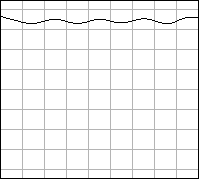
If you boost/attenuate all frequencies equally on other equalizers, the resulting frequency response will take on a wavy appearance (the further from 0 dB, the stronger the "waves"):

graphic equalizer

In my equalizer, with the same boost/attenuate for all frequencies, the frequency response remains absolutely straight (regardless of the distance to 0dB):
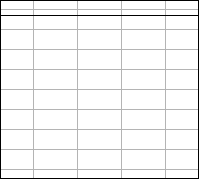
graphic equalizer

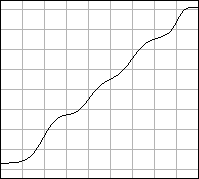
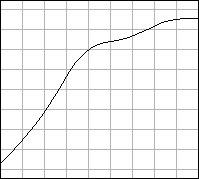
If you try to synthesize the frequency response in the form of a sloping line on other equalizers, the frequency response will have a wavy appearance (the further from 0 dB, the stronger the "waves"):

graphic equalizer

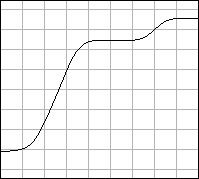
In my equalizer, the sloping line will also be wavy, but the deviation from the straight line will be very small (not even visible on the graph) and independent of the distance to 0 dB:
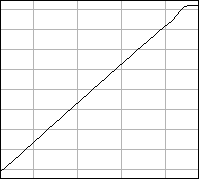
graphic equalizer

The graph shows the frequency range from 25 to ~26300 Hz. Vertical scale: 6 dB between horizontal lines.
Equalizer for mixing

All the DJ software and equipment I've seen uses a 3-band EQ based on 4th order Linkwitz-Riley filters. I think Linkwitz-Riley filters are not suitable for a mixing EQ at all. Why? Typically, a composition is added and removed from a mix in a muted form, i.e. when the low frequencies are strongly muted, the middle - moderately and the high - a little. Since 4th order Linkwitz-Riley filters have a steep slope - 24 dB per octave, the equalizer frequency response takes the form of steps:

3-band equalizer with Linkwitz-Riley filters

A particularly high "step" between the lows and mids. If a significant part of the sound spectrum is in the region of this step (for example, male vocals), the timbre of this sound is noticeably distorted. In some cases, the distortion is so noticeable that, while listening to the mix, you can determine by ear the position of the equalizer handles at a given moment in time.

To eliminate this effect, the mixlab program uses filters with a slope of 6 dB per octave in the equalizer for mixing, so there are no pronounced steps in the frequency response:

graphic equalizer in mixlab program

The smooth frequency response makes the mix sound as if no equalizer was used at all.

In addition, with all knobs in the middle position (0 dB), my equalizer has no phase distortions, while the equalizer with Linkwitz-Riley filters has phase distortions - the total phase shift is 720 degrees. Phase shift means a delay of the high-frequency components of the sound relative to the low frequencies. For percussive sounds, this means that the body begins to vibrate before it is struck, and the strike itself is smeared in time, i.e. it turns from a strike into a slap.

Headphones connection

In all DJ programs and equipment I've seen, headphones hp are connected after the equalizer eq:

                              |-------|
                |-----------> |       |
player --> eq --|             |       |
                |--> |----|   |       |
                     | hp |   | mixer |
                |--> |----|   |       |
player --> eq --|             |       |
                |-----------> |       |
                              |-------|

Typically, a composition is added and removed from a mix in a muted form. Therefore, when connecting headphones after the equalizer, listening to the composition in headphones during the adding and removing will be difficult.

The mixlab program is free from this drawback. In mixlab there are two separate equalizers - for timbre correction eq1 and for mixing eq2. Headphones are connected before the eq2 equalizer and therefore it does not affect the sound in the headphones:

                                       |-------|
                 |-----------> eq2 --> |       |
player --> eq1 --|                     |       |
                 |--> |----|           |       |
                      | hp |           | mixer |
                 |--> |----|           |       |
player --> eq1 --|                     |       |
                 |-----------> eq2 --> |       |
                                       |-------|