go up a level
Customizing the appearance of Windows XP
If you enable "Classic style" in Windows XP, the Windows interface
will look like this:
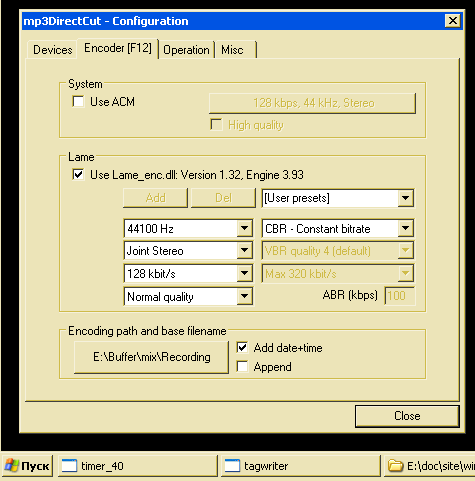
This is much better than "Windows XP Style", but some borders are almost
invisible, others are too bold, some inscriptions are hard to read.
This can be fixed:
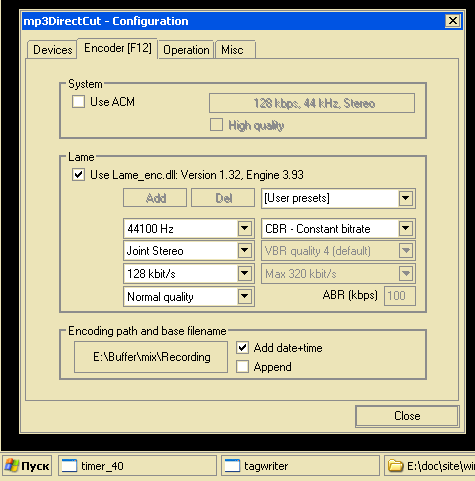
To do this, set the following registry parameters:
Windows Registry Editor Version 5.00
[HKEY_CURRENT_USER\Control Panel\Colors]

"ActiveBorder"          = "236 228 184" ; window background
"InactiveBorder"        = "236 228 184"

"AppWorkSpace"          = "236 228 184" ; background in Word when no document is open
"Background"            = "0 0 0"       ; desktop wallpaper?

;;;;;;;;;;;;;;;;;;;;;;;;;;;;;;;;;;;;;;;;;;;;;;;;;;;;;;;;;;;;;;;;;;;;;;;;;;;;;;;;;;;;;;;;;;;;;;;;;;;;;;;;;;;;;;;

"ButtonHilight"         = "140 140 140" ; WindowLight
                                        ; background of the active window in the taskbar and background of the scrollbar1
                                        ; text shadow of inactive button
                                        ; shadow of the divider in the menu
                                        ; right and bottom border of the tray

"ButtonLight"           = "236 228 184" ; WindowHilight

"ButtonFace"            = "236 228 184" ; background of the active window in the taskbar and background of the scrollbar2
                                        ; scrollbar
"ButtonText"            = "0 0 0"

"ButtonShadow"          = "140 140 140" ; text of inactive button
                                        ; text of inactive menu in explorer
                                        ; menu separator
                                        ; left and top border of the tray

"ButtonDkShadow"        = "236 228 184"

;;;;;;;;;;;;;;;;;;;;;;;;;;;;;;;;;;;;;;;;;;;;;;;;;;;;;;;;;;;;;;;;;;;;;;;;;;;;;;;;;;;;;;;;;;;;;;;;;;;;;;;;;;;;;;;

"Menu"                  = "236 228 184" ; if ("0 0 0")?, then inactive menu items are drawn without shadow
"MenuText"              = "0 0 0"
"GrayText"              = "140 140 140" ; tree branches in foobar2000 and visual studio
                                        ; sort arrow in explorer

;;;;;;;;;;;;;;;;;;;;;;;;;;;;;;;;;;;;;;;;;;;;;;;;;;;;;;;;;;;;;;;;;;;;;;;;;;;;;;;;;;;;;;;;;;;;;;;;;;;;;;;;;;;;;;;

"ActiveTitle"           = "0 84 227"
"GradientActiveTitle"   = "0 84 227"

"InactiveTitle"         = "122 150 223"
"GradientInactiveTitle" = "122 150 223"

"TitleText"             = "255 255 255"
"InactiveTitleText"     = "216 228 248"

;;;;;;;;;;;;;;;;;;;;;;;;;;;;;;;;;;;;;;;;;;;;;;;;;;;;;;;;;;;;;;;;;;;;;;;;;;;;;;;;;;;;;;;;;;;;;;;;;;;;;;;;;;;;;;;

"Hilight"               = "170 255 170" ; background of selected text
"HilightText"           = "0 0 0"       ; selected text

"HotTrackingColor"      = "0 0 255"     ; Date and Time > Internet Time: "time synchronization"

"InfoText"              = "0 0 0"       ; hint text
"InfoWindow"            = "255 255 0"   ; hint background

"Scrollbar"             = "212 208 200" ; text background in unfocus cell (where? need to find)

"Window"                = "255 255 255" ; if ("0 0 0" or "255 255 255")?, then the background under the column
                                        ; by which sorting occurs in the explorer != ("0 0 0" or "255 255 255")?

"WindowFrame"           = "140 140 140" ; the frame of the non focus button
                                        ; the frame of the hint
"WindowText"            = "0 0 0"

;;;;;;;;;;;;;;;;;;;;;;;;;;;;;;;;;;;;;;;;;;;;;;;;;;;;;;;;;;;;;;;;;;;;;;;;;;;;;;;;;;;;;;;;;;;;;;;;;;;;;;;;;;;;;;;

"MenuHilight"           = "49 106 197"  ; ?
"ButtonAlternateFace"   = "181 181 181" ; ?
"MenuBar"               = "236 228 184" ; ?
* * *
Yes, I still use Windows XP. New Windows is better?